Introducing OurScreen: press record, Smart Director handles the rest
The short version: OurScreen is now available for Mac. Record your screen, camera, microphone, and system audio, then let Smart Director review the take and suggest zooms, framing, cleanup, and captions. Free for 15 days, then $25/year or a one-time $59 Founder Lifetime. Start your trial.
Most screen recorders hand you a blank timeline and wish you luck.
You record the lesson. Then the second job starts: scrub the timeline, keyframe a zoom for every click you made, hunt down each "um," reposition the webcam, type out captions. For a five-minute video, that's often an hour of editing. For a teacher who finished a full day at 6pm, or a course creator staring down forty more modules, that hour is the reason the video doesn't get made.
We built OurScreen so that hour disappears.
A director, not an editor
After you record, Smart Director reviews the take and suggests routine edits for you to approve or adjust:
- Auto Zoom zooms to wherever you clicked, at the moment you clicked. Nothing to keyframe.
- Camera styles frame your camera once — circle, rounded, or custom — and hold it steady for the whole take. The camera stays on its own track, so you can change it after recording too.
- Clean Speech identifies filler words and long dead air, then proposes cuts you can review before export.
- Captions can be generated and edited after recording, on your Mac, in 97 languages — including Urdu with Nastaliq styling and right-to-left text.
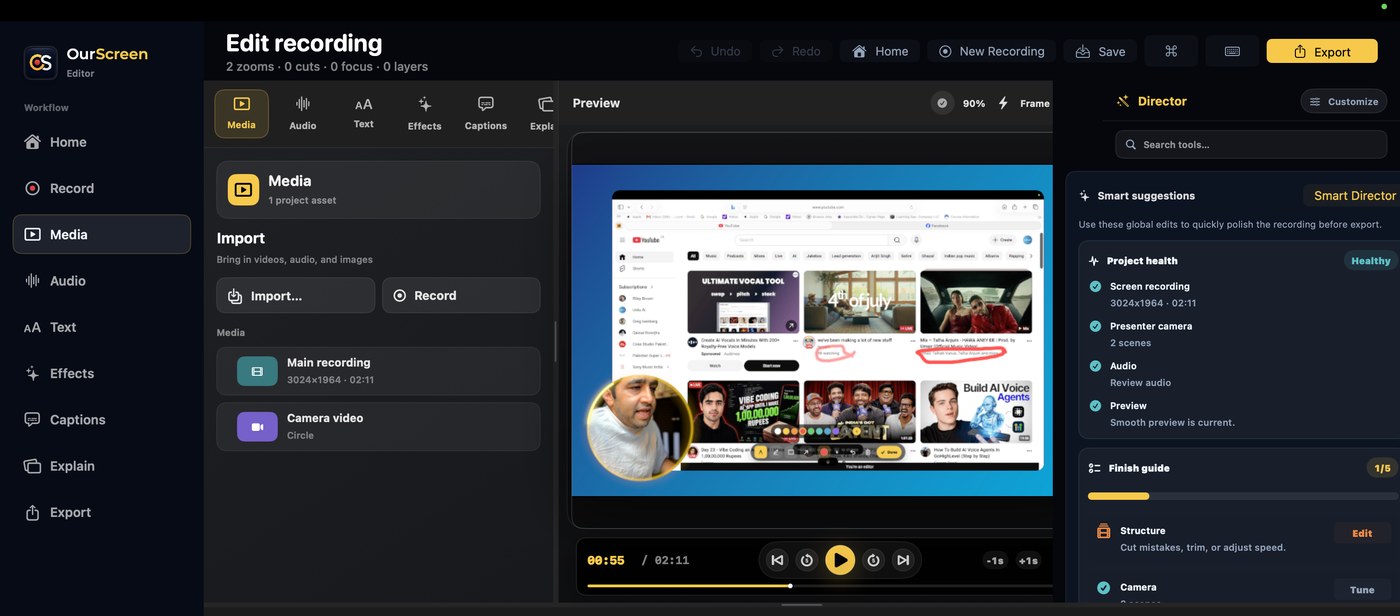
That screenshot isn't a mockup. It's one take, untouched — the zooms and camera framing you see were placed by Smart Director before export.
And when you do want control, the full editor is there: a real timeline, cuts, speed, text layers, effects, imported media. Smart Director's choices are a starting point, never a lock-in.
Draw on the screen while you're talking about it
Two features come from watching teachers work.
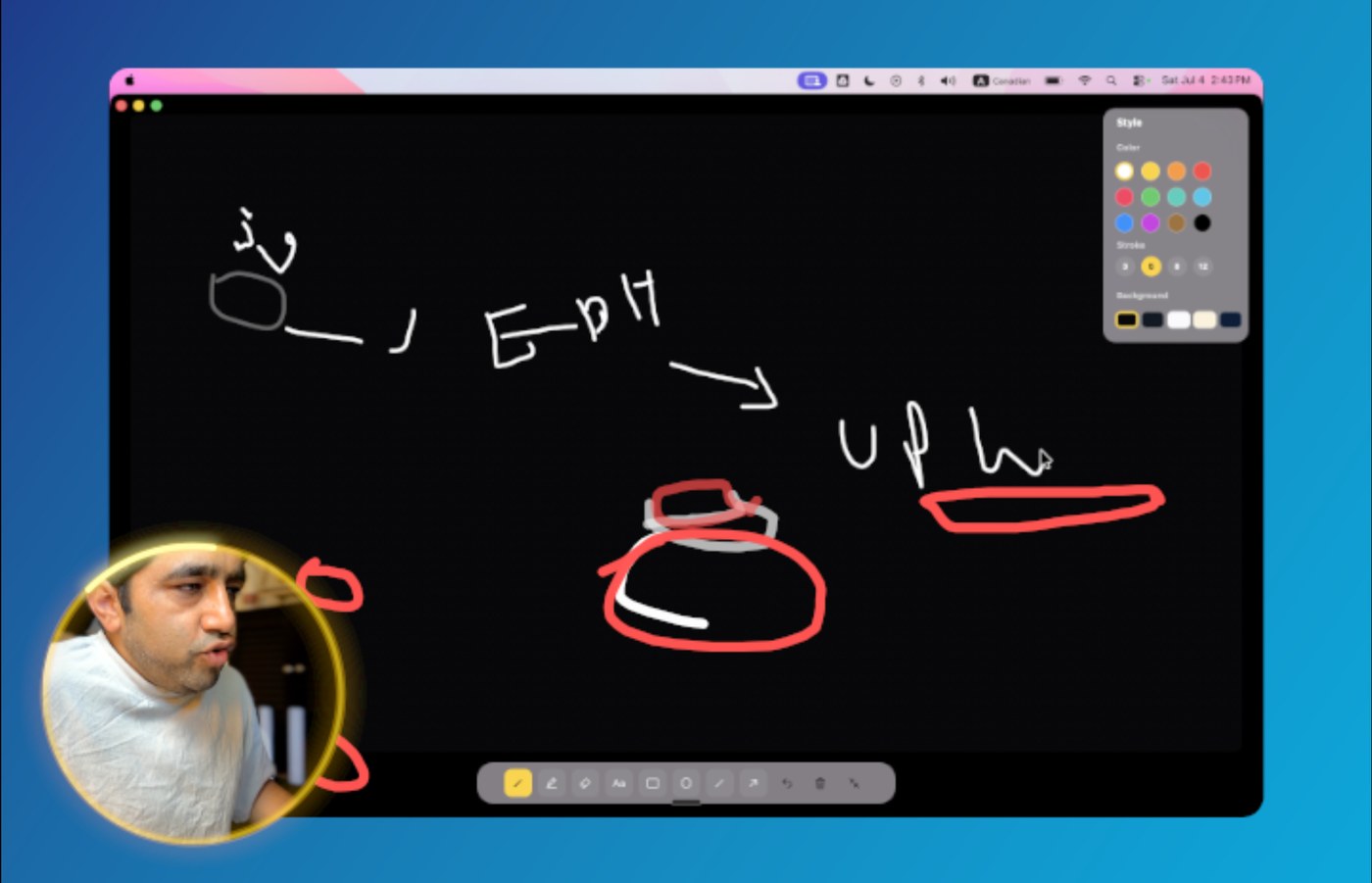
Screen Draw lets you circle, underline, or write directly on your live screen mid-recording — right when you're saying "look at this number here." The annotation lands in the recording at that exact moment, not bolted on in an editor afterwards.
Explain goes further: it turns your screen into a board. Sketch a diagram, work through a problem, then go back to your slides — without leaving the recording.
Your recordings never leave your Mac
OurScreen is local-first. Recording, editing, and captioning all happen on your Mac. Nothing uploads to a cloud to make the app work — activation only checks that your license or trial code is valid.
If you record lessons with student names on screen, dashboards with real data, or material that isn't public yet, that's not a nice-to-have. A recording that never leaves your machine can't leak from someone else's server, and there's no permanent cloud copy to worry about later. Our privacy checklist for schools goes deeper on this.
Honest pricing, including a lifetime deal
You've probably watched tools you rely on drift into subscriptions that creep upward. We priced OurScreen against that current:
- Free for 15 days. Full Smart Director access, no credit card to start.
- $25/year. Unlimited recordings and updates while the plan is active.
- $59 Founder Lifetime. One-time access to the core Mac app and all 1.x core updates. Limited spots.
No per-seat billing, no metered credits, no surprise tier you have to upgrade into for the feature you actually wanted. See pricing for the details.
What is in OurScreen 1.2.7
Today the app records screen, camera, microphone, and system audio in one take; records iPhone and iPad screens over USB; imports existing video and audio for polish; styles captions with named presets; builds numbered lesson agendas that reveal one step at a time; and exports sized for YouTube, Shorts, Reels, courses, and Slack.
It's a native Mac app, Apple Silicon and Intel, signed and notarized. Mac-only is a choice, not a gap — it's how the recording, preview, and export stay fast and reliable.
Who it's for
OurScreen is built for people who explain things: teachers recording lessons after hours, course creators producing at volume, coaches and tutors, and anyone whose walkthrough needs to be out the door in ten minutes. If you've never heard of a keyframe, you'll never need to. If you have — everything's still there under the hood.
Try it today. Download OurScreen for Mac and record your first polished lesson in the next ten minutes. Start your free 15-day trial — no credit card.
FAQ
What is OurScreen?
A native Mac screen recorder for teachers, coaches, and creators. After recording, Smart Director reviews the take and suggests zooms, camera framing, speech cleanup, and captions for you to approve or adjust.
Does OurScreen upload my recordings to the cloud?
No. Recordings and projects stay on your Mac. Nothing uploads to record, edit, or caption. Activation only checks that your license or trial code is valid.
How much does it cost?
Free for 15 days with no credit card. Then $25/year, or a one-time $59 Founder Lifetime license with the core Mac app and all 1.x core updates — limited spots.
Which languages do captions support?
97 languages, generated on-device — including real Urdu with Nastaliq script and right-to-left text.